Stems that never drift apart
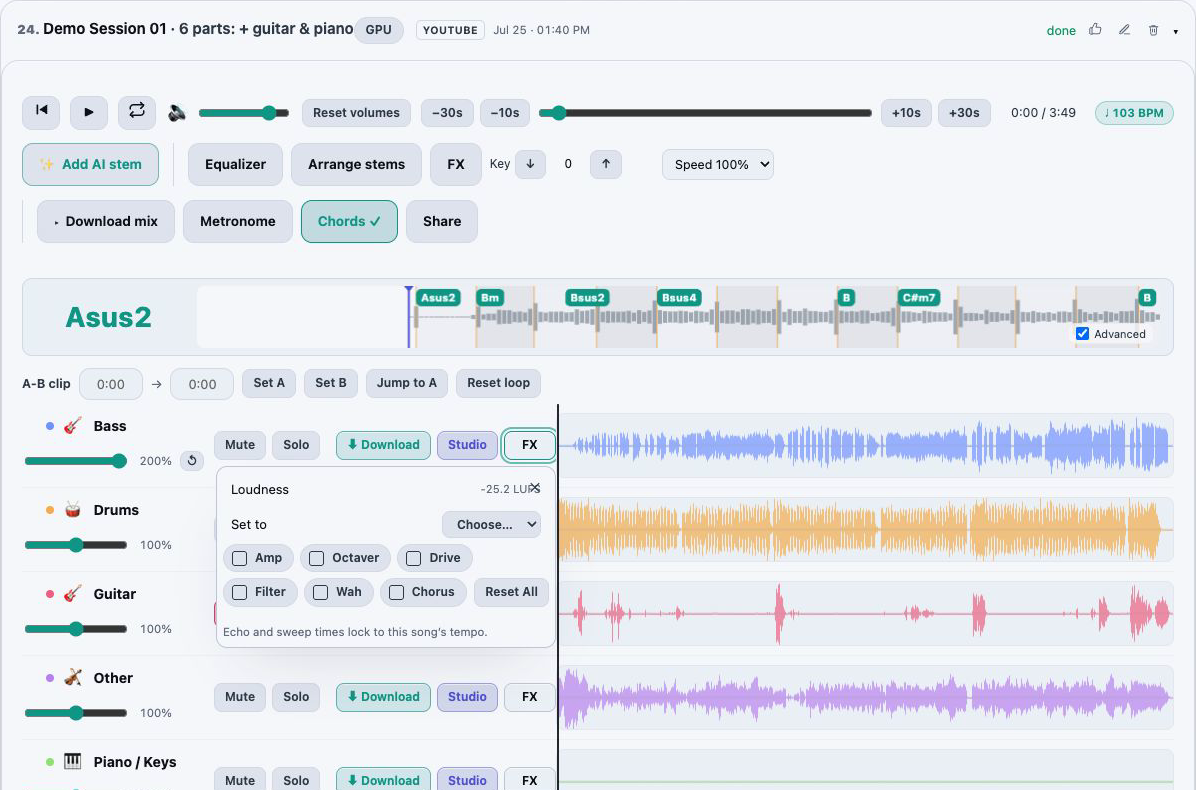
All rows share a single playhead and waveform timeline. Play, seek, jump 10 or 30 seconds and set the master volume once; every part follows.
AudioStem.ai is a multitrack mixer that runs in your browser. Every stem of a track, whether AI separated it from a song or you added it yourself, plays from one shared transport, so the parts stay locked together while you balance, mute, solo, trim and shape them.
When the balance is right, you keep it: on Studio the custom mix you export carries your faders, mutes, edits, fades, EQ, key and effects, so the file you download is the version you were listening to.
Start free, no card required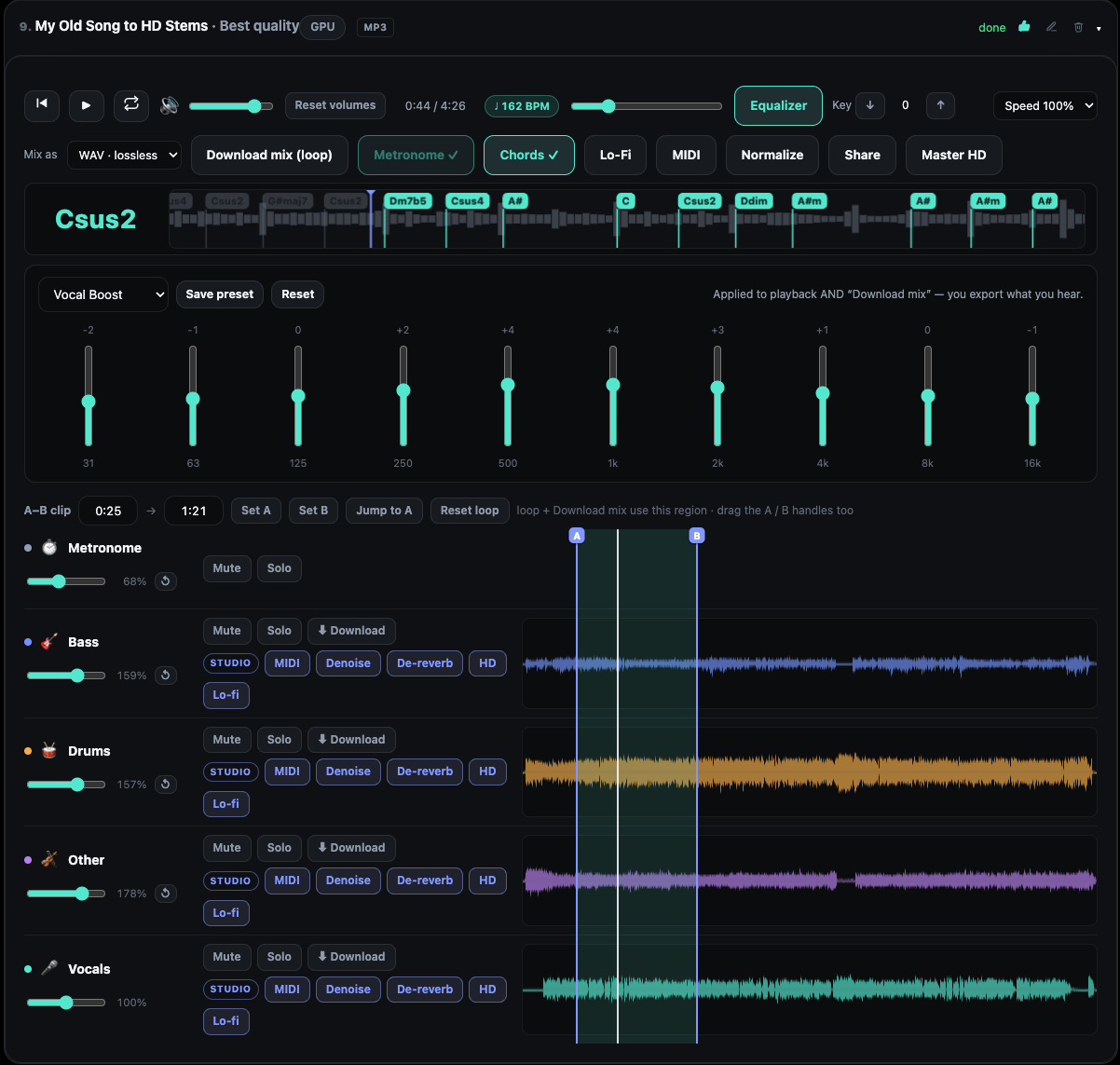
All rows share a single playhead and waveform timeline. Play, seek, jump 10 or 30 seconds and set the master volume once; every part follows.
Pull the drums down, mute the vocal, or solo the bass to check what it is doing, all while the song keeps playing.
Pick a range with A and B, then silence it on a single stem or fade that stem in or out across it. The source file is left untouched, so any range can be brought back.
Reorder the stems so the list reads the way you think about the song, and permanently remove a stem you will never use once you have seen how much storage it frees.
Studio adds an mp3, a wav or the sound from a video as another row, lets you nudge it earlier or later to line it up, and can start from an empty track built only from your own stems.
Every paid plan downloads individual MP3 stems. Studio adds lossless WAV, the full custom mix and a download of just the A/B region.
Separate a song, open one already in your library, or on Studio create an empty track and add your own recordings as stems.
Click a waveform to move the playhead, or drag across it to set A and B. Type the markers instead when you need them exact, to a hundredth of a second.
Set volume, Mute and Solo per row, then mute or fade the selected range on any stem that needs it. Undo All clears every edit on that one stem.
Add EQ and, on Studio, the effects racks, then download stems or the exact custom mix.
The usual route after splitting a song is to download a folder of stems, import them into a desktop audio workstation, line them up and start again. That is a lot of setup for a quick backing track, a practice mix or a quick check of how one part was played.
Here the stems arrive already aligned on one timeline, with the controls attached. You can make mixing decisions while you listen, and long jobs such as separation, analysis, cleanup or mastering run in the background while you carry on working. The Working on list keeps them visible if you refresh or close the tab, and finished results come back to the same song.
Stem editing in AudioStem.ai is deliberately focused on the jobs people need most from separated audio. Set an A/B range, then choose what happens to that range on one stem:
Edits are kept as instructions on top of the original stem rather than written into it, which is why restore always works. Those instructions follow the stem everywhere it is heard: playback, custom mixes, share links, loudness normalization and HD mastering all use the edited version.
Practice speed is the one exception by design. Slowing a song down changes playback only, so an export always plays at the original tempo.
Studio turns the mixer into a place to assemble music, not only to take it apart. Add a recording to an existing track as an extra stem, for example a guitar take to play against the separated band, or start an empty track and fill it entirely with files you bring, up to 10 per track.
Each custom stem can be moved by an exact number of seconds, down to hundredths, or reset to where it started. The chord lane and the metronome are rebuilt to fit the new arrangement. Custom stems use storage only and never spend separation minutes. A finished Studio cleanup or mastering result can join the mixer the same way, as another row.
On Studio, a custom mix export includes your volume, mute, stem edits, fades, EQ, key and effects choices, and HD Master can rebuild the same audible mix. Individual stems download as MP3 on every paid plan and as lossless WAV on Studio. The mixer works on a desktop or on a touch screen, so you can check a balance on a tablet without moving to another app.
Free plays and mixes stems in the browser, with the player, mixer, A/B loop and EQ, for 20 full-length songs a day. Free tracks are cleared after 24 hours, and downloads need a paid plan.
Starter, at $4.99 per month, adds MP3 stem downloads and 10 GB of storage, with stems kept for as long as you subscribe.
Studio, at $9.99 per month, adds custom stems and empty tracks, effects racks for every stem and the master, lossless WAV and custom mix exports, and 50 GB of storage with stems kept for as long as you subscribe.
Yes. Free includes the synchronized player, the mixer, the A/B loop and EQ for every stem in the browser. Downloading stems or a mix is part of the paid plans.
Yes. Every stem shares one transport and one waveform timeline, so seeking, jumping, looping and muting never shift one part against another.
No. The original stem file is not rewritten. Mutes and fades are stored as edits, so you can restore a range or clear every edit on a stem with Undo All.
On Studio. Add an mp3, a wav or a video’s sound as an extra stem, then shift it earlier or later until it lines up. You can also start an empty track built only from your own stems, using storage and no separation minutes.
On Studio it includes your volume, mute, stem edits, fades, EQ, key and effects. Practice speed is not included, so the export plays at the original tempo.
On Studio, yes. Set A and B and download only the selected region.
Yes. The same mixer runs on desktop and on touch screens in the browser, with nothing to install.
A 10 band EQ and live effects racks for every stem and the master: vocal reverbs and delays, guitar amp and wah, bass octaver, drum punch, width and limiting.
Split any song into vocals, drums, bass, guitar, piano and more with AI models, then play, mix and export the stems in your browser. Free plan included.
Master a mix or a single stem online: four HD mastering styles, AI denoise and reverb removal, LUFS loudness targets and 48 kHz audio super resolution.
Practice with any song: slow it down without changing pitch, change the key, loop a hard section, follow live chords and BPM, and solo the part you play.