Separate vocals and instruments
Choose 4 or 6 stem separation, vocal, guitar, piano, karaoke, or drum kit models for kick, snare and cymbals. Pro and Studio add the complete model catalog and faster GPU processing.
AudioStem.ai is an AI stem splitter and online audio mixer for musicians, producers and creators. Separate vocals, drums, bass, guitar, piano and more, then practice, edit individual parts, remix, add effects, master and export without rebuilding the song in another app.
Start free, no card required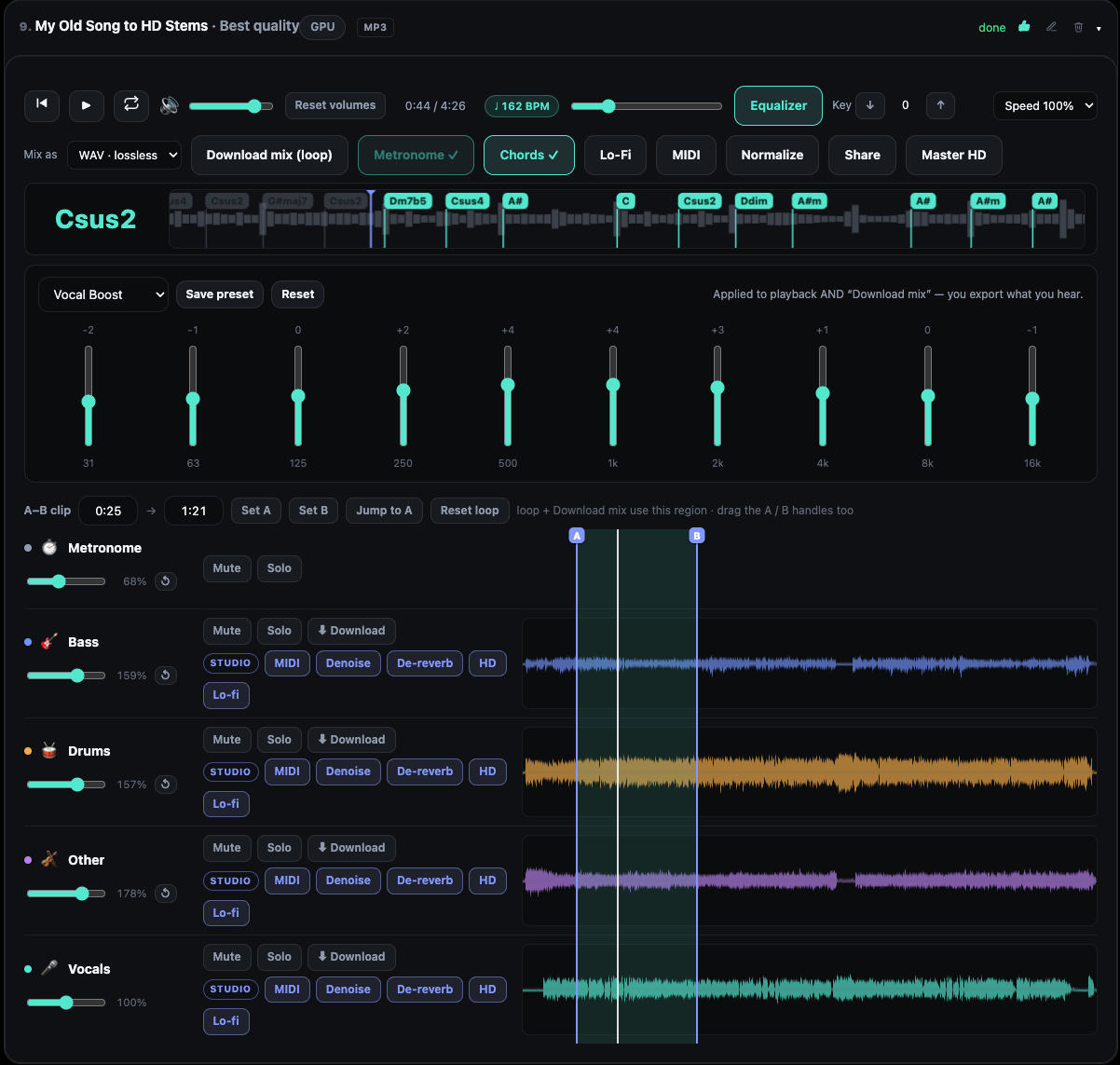
Keep one track open from upload to finished export. The synchronized player, practice controls, stem mixer, song analysis, effects and mastering tools all work on the same separated audio.
Choose 4 or 6 stem separation, vocal, guitar, piano, karaoke, or drum kit models for kick, snare and cymbals. Pro and Studio add the complete model catalog and faster GPU processing.
Play, seek, mute, solo and loop a difficult section. Pro adds automatic BPM, detected musical key and chords, including optional changes between beats. Studio adds an Auto Metronome with half, normal and double tick speed, key control across 12 semitones and speed from 50% to 120% while preserving pitch.
Set volume, Mute and Solo for each stem, shape each part with a 10 band equalizer and 13 presets, then save custom EQ presets and build a complete custom mix in the browser. Select an A/B range to erase part of one stem, add a fade in or fade out, or restore it later. Arrange stems in any order, or permanently remove one after reviewing the storage you will recover.
Use vocal, guitar, bass, drum and master effects including amp, reverb, delay that follows the beat, drive, chorus, wah, octaver, compression, stereo width and limiting.
Follow the detected tempo, musical key and current or upcoming chords during playback. Show chord changes between beats when you need more detail. Measure the loudness of one stem or the complete mix in LUFS, then choose the loudness target you want. Pro and Studio can export MIDI from one stem or the full mix.
Studio adds AI denoise, reverb removal, Lo Fi processing, loudness normalization at minus 14 LUFS, 48 kHz audio super resolution and Faithful, Studio Master, Wide/3D and Warm Tape mastering styles. HD Master follows the faders, mutes, stem edits, fades and practice key you hear. When EQ or FX are active, choose a separate HD master with that sound included. Add a completed Studio result back to the mixer as another stem, or export MP3, lossless WAV and your exact mix.
A part your song does not have, generated inside the same session and added as an ordinary stem you can mix, master and export. It follows the tempo, key and chords we measured in your track rather than copying how your recording sounds. It is in final quality testing and is not switched on yet.
AudioStem goes beyond downloading separated files. The effects studio is a Pro and Studio feature: hear it live while the song plays, then include EQ and FX for each stem in individual lossless WAV files and custom mixes. The effects follow the detected BPM even when practice speed changes.
Hall, room and plate reverb, slapback and ping pong delay, doubler, Harmonizer with Deep and Light voices, drive, filters and ring modulation.
Guitar amp and modulation, bass compression and octaver, plus drum punch, gated rooms and filter sweeps.
Stereo width, glue compression, limiting, Lo Fi and reverb for the complete mix.
Longer processing does not disappear when you close the tab. The Working on list restores active jobs after a refresh and returns completed results to the same song.
Start separation, analysis, cleanup or mastering, continue using the mixer and return later from desktop or a mobile touch screen.
When billable processing fails and its refund is confirmed, the activity row shows that the charged minutes were already returned.
Add a completed cleanup or mastering result as another stem, arrange its position and continue with EQ, effects and export.
Solo a part, slow it down, loop hard sections, follow chords and practice with the detected tempo.
Remove lead vocals, create a backing track, shift the key and prepare a custom mix that is ready for the stage.
Extract clean parts, export MIDI, design each stem with EQ and FX, and download lossless stems or a mixdown.
Separate dialogue or music elements, reduce noise and reverb, normalize loudness and master for consistent playback.
Try 20 ten minute clips per day with 2 core models, 2 GB storage, 3 day retention, synchronized playback, mixing, A/B loops, EQ and MP3 downloads.
Choose Starter when you only need basic stem separation. It includes 200 audio minutes, about 57 songs, 10 GB storage and 30 day stem retention. Process full songs with the 2 core models and download MP3 stems. Annual billing is $79.99.
Choose Pro for advanced stem separation. It includes 500 audio minutes, 25 GB storage and 90 day stem retention. Unlock all 10 separation models, faster GPU processing, BPM, musical key, chords, MIDI, FX exports, WAV, custom mixes, YouTube links and sharing. Add HD and AI minutes when you need them with 60 minutes for $9, 140 for $19 or 220 for $29. Annual billing is $159.99.
Studio includes everything in Pro, 1000 audio minutes, 100 GB storage and 365 day stem retention. You also get 200 HD and AI minutes that reset every month, key and speed controls, Auto Metronome, cleanup, loudness tools, four named mastering styles and priority processing. Annual billing is $199.99.
It splits any song into vocals, drums, bass, guitar, piano and more, then keeps every part inside one browser studio. You can play synchronized stems, edit one part with erase and fades, set an A/B practice loop, mix with EQ and FX, detect BPM, musical key and chords, set loudness targets, export MIDI, change key or speed, clean noisy audio, and master or download the result.
Yes. Every separated stem stays synchronized in the browser mixer and has its own volume, Mute, Solo, 10 band EQ and effects rack. You can erase or fade a selected range of one stem without changing the others. Pro and Studio can export the custom mix with your stem edits, EQ, key and effects choices included.
Yes. Set A and B, then erase that range from one stem, add a fade in or fade out, restore the selected range, or clear every edit on that stem. The original stem is not rewritten. Playback, custom mixes, sharing, loudness normalization and HD mastering follow the edits you made.
Yes. Make A/B loops, mute or solo parts and seek on synchronized waveforms. Pro adds automatic BPM, musical key and chords with optional changes between beats. Studio adds Auto Metronome tick speed, key control and playback speed that preserves pitch.
Yes, on Pro and Studio. Vocal tools include reverb, delay, doubler and a Harmonizer with Deep and Light voices. They hear every effect live and can include it in individual lossless WAV stems and custom mixes. Free and Starter can open every rack before upgrading.
Upload MP3, WAV, M4A, FLAC, OGG and other common audio formats. Tracks up to 90 minutes are supported. Every plan downloads MP3. Pro and Studio add lossless WAV and custom mixes.
No. Your audio is processed solely to produce your stems, is never used to train or improve any model, and is never sold or shared with model vendors.