Reduce noise in a stem or a mix
Studio runs AI denoise on one stem or the full mix, for hiss under a vocal or the background noise of a home recording.
Finish a mix, or a single stem of it, in the same browser session where you separated and balanced it. AudioStem.ai measures loudness in LUFS, and Studio adds AI denoise, reverb removal, Lo Fi, loudness normalization, 48 kHz audio super resolution and four HD mastering styles.
Because the master is built from the session, it hears what you hear: your fader moves, your mutes, the sections you muted or faded on one stem and the practice key. There is no exporting stems to a separate mastering tool and rebuilding the balance there.
Start free, no card required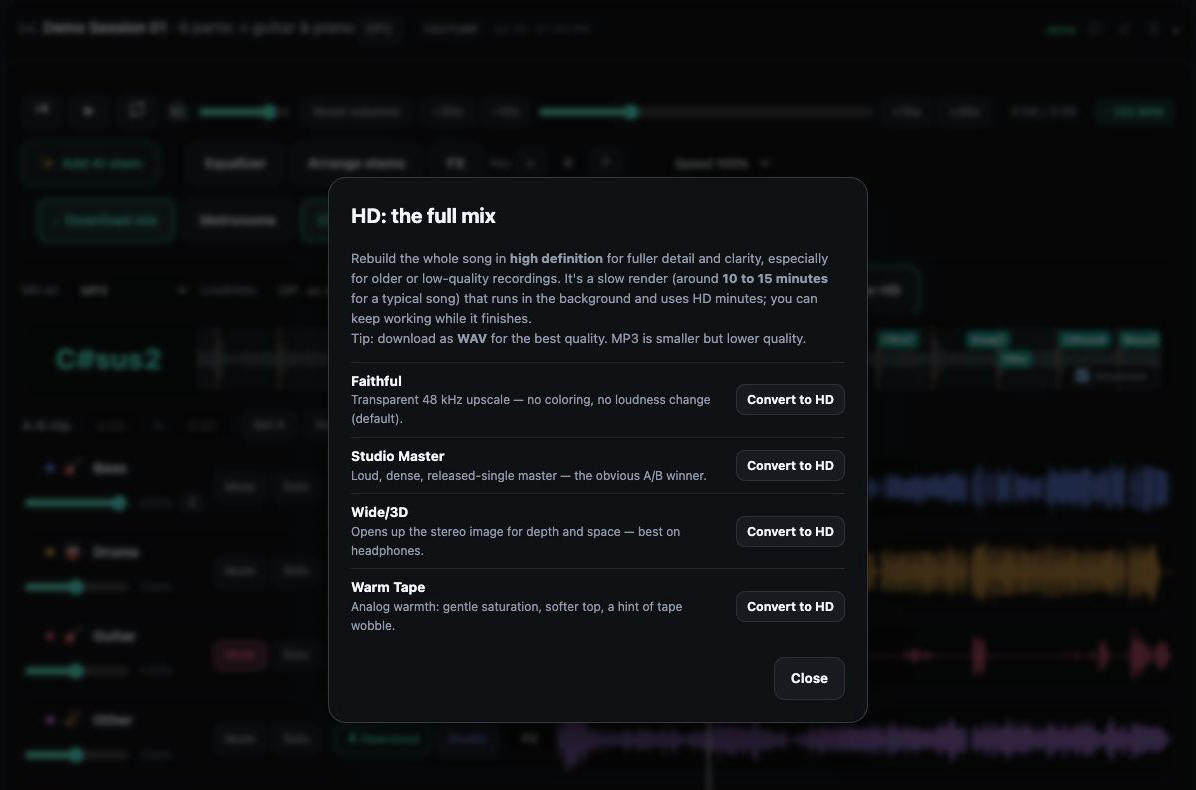
Studio runs AI denoise on one stem or the full mix, for hiss under a vocal or the background noise of a home recording.
Studio can take reverb out of a part, so a voice recorded in a reflective room, or one separated from a wet mix, sits closer and is ready for new effects.
Read the EBU R128 loudness of a single stem or the complete mix and choose the level you want. Studio normalizes to minus 14 LUFS.
Four named mastering styles on Studio produce an HD master of your mix. Each one spends HD and AI minutes by length.
Render a stem or a mix at 48 kHz with audio super resolution, on Studio or with an HD pack.
A completed Studio cleanup or mastering result can be added to the mixer as another stem, positioned, compared with the original and processed further.
Separate or reuse a track and set the balance in the mixer: faders, mutes, and muted or faded ranges on any stem.
Check one stem or the whole mix in LUFS, then decide on the loudness you are aiming for.
On Studio, run denoise, reverb removal, Lo Fi or loudness normalization on the stem or mix that needs it. The job stays on the Working on list while you keep mixing.
Pick Faithful, Studio Master, Wide/3D or Warm Tape. If EQ or FX are switched on, decide whether this master should carry that sound.
Add the finished result to the mixer as a stem, compare it against the original, and download the version you want.
HD Master works from the session rather than from a file you hand it. It follows your faders and mutes, the ranges you muted or faded on any stem, and the practice key if you moved it. Change the balance and master again, and the new file reflects the new balance.
EQ and effects are an explicit choice. When the EQ or an FX rack is active, you can ask for a separate HD master that includes that sound, which keeps an experimental reverb from slipping into a final file by accident. Practice speed is different again: it changes playback only and never ends up in an export.
LUFS, loudness units relative to full scale, describe how loud audio feels over time rather than how high its peaks reach, which is why online platforms and broadcasters work with them. AudioStem.ai measures EBU R128 loudness for one stem or the complete mix, so you can see where a track sits before you change anything.
Minus 14 LUFS is the normalization level Studio offers, a widely used reference for music heard online. Measure first, normalize when several tracks need to play back at a consistent level, and keep in mind that normalization follows any edits you made to the stems. Measuring one stem on its own is useful too, for example to check a dialogue or vocal part against the music under it.
Home recordings and separated stems both carry things you may not want in a finished file: steady background noise, room sound, reverb baked into a part. Denoise and reverb removal on Studio go after those directly, and because they can run on a single stem you can dry out a vocal without touching the drums.
Each cleanup or mastering pass runs in the background. The Working on list keeps it visible after a refresh, so you can close the tab and come back to the same song, and if a billable job fails and its refund is confirmed, the activity row tells you the charged minutes were returned.
Mastering is only half of finishing; the other half is getting the right file out. What you can download depends on the plan:
Studio, at $9.99 per month, includes AI denoise, reverb removal, Lo Fi, loudness normalization at minus 14 LUFS, the four mastering styles and 48 kHz audio super resolution, with 60 HD and AI minutes each month.
Super resolution and HD mastering draw on those HD and AI minutes: each minute of audio sent through one of them uses one minute of the balance, and monthly minutes are used first. Studio can top up with minute packs, 60 minutes for $9, 140 for $19 or 220 for $29, that never expire.
Starter, at $4.99 per month, downloads MP3 stems; Free plays and mixes in the browser without downloads.
Yes, on Studio. Choose Faithful, Studio Master, Wide/3D or Warm Tape and an HD master is made from the mix you set up, following your faders, mutes, stem edits, fades and practice key.
Yes. The Studio cleanup and mastering tools work on one stem or on the complete mix, and the result can come back into the mixer as another stem.
Studio normalizes to minus 14 LUFS. You can also measure any stem or the full mix in LUFS first and choose the loudness you want.
On Studio, run AI denoise or reverb removal on the stem or mix that needs it. When it finishes, add the result to the mixer as a stem and compare it with the original by muting one or the other.
It is available on Studio or with an HD pack and uses HD and AI minutes: one minute of the balance for each minute of audio processed.
Only when you choose it. While EQ or FX are active you can pick a separate HD master that includes that sound.
MP3 stems on every paid plan. Studio adds lossless WAV, MIDI, stems with FX, a selected A/B region and custom mixes that include your edits, EQ, key and FX.
A 10 band EQ and live effects racks for every stem and the master: vocal reverbs and delays, guitar amp and wah, bass octaver, drum punch, width and limiting.
Mix stems in your browser on one synchronized timeline: volume, mute and solo, silence or fade a section of one stem, arrange the parts and export the exact mix you hear.
Split any song into vocals, drums, bass, guitar, piano and more with AI models, then play, mix and export the stems in your browser. Free plan included.
Compare the AudioStem.ai plans: what each one includes for stem separation, AI songs and vocals, mixing, mastering, storage and HD and AI minutes.