Lyrics you write, sung back
Type the lyrics with [Verse] and [Chorus] tags and pick the language. Where that option is on, the AI can write them for you from a short theme line instead.
Split a song into stems, write the words you want to hear, and an AI voice performs them over your own instruments. The original vocal stem is muted rather than removed, and any take you keep becomes one more stem in the mix.
Use it to hear a lyric on a real backing track before anyone books a session: a topline over a beat, new words for an arrangement you play, or a vocal sketch for a demo.
Start free, no card required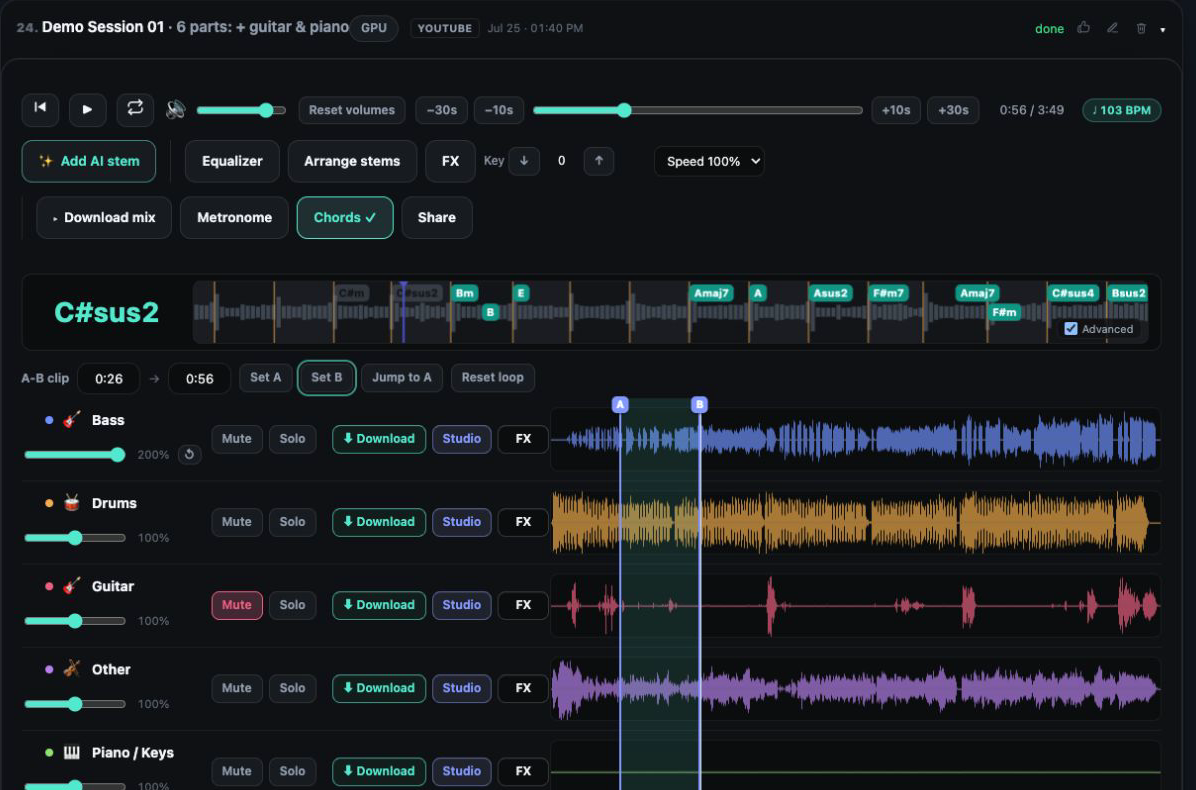
Type the lyrics with [Verse] and [Chorus] tags and pick the language. Where that option is on, the AI can write them for you from a short theme line instead.
Pick any, male, female or duet voice, and add a short style hint to steer the delivery.
A request sings the whole track twice for one charge. Audition both in the mixer, keep one or both, or press More takes to have the same lyrics sung again as a new request.
Kept takes arrive as AI Vocals stems beside the instruments they were sung over, ready for volume, EQ, effects, mastering and export.
Mark up to four sections, then pick the choir (male, female or mixed) and its words. It lands on its own stem underneath your existing vocals.
Verify your own singing voice once; after that, takes can be sung in it and vocal stems redone in it.
AI vocals are sung over stems, so begin with a track split by any separation model. Without stems there is nothing to sing over.
Write or paste your lyrics, or press Write lyrics (AI) to draft them from a few words. Choose a voice and, if you want, a style hint.
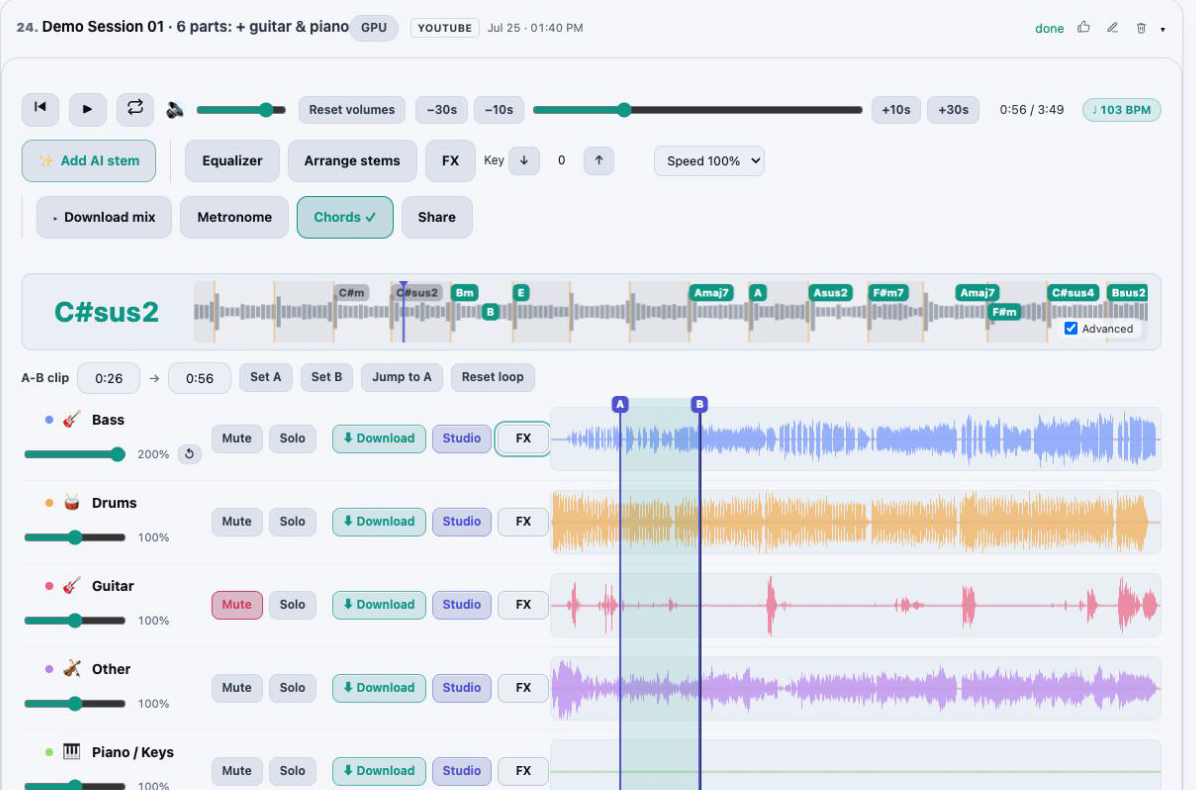
Your original vocals go quiet while the takes play over the band. Compare them at your own levels and inside your A/B loop.
Keep one or both takes as stems, press More takes for another round of the same words, and discard the rest.
The feature works on stems for a reason: the AI sings over what is left once the vocal is set aside, which is your own band, not a stock backing track. Every take covers the full song, so one listen tells you how the words sit in the verses, the hook and the bridge.
Since the original vocal is only muted, you can bring it back to compare phrasing, or keep both and blend them. The new take is another row in the mixer and accepts the same EQ, effects and mastering as every other part.
For support instead of a replacement, switch the AI lyrics panel to Backing chorus. Choose up to four sections, taken from your A/B loop, from a range around the playhead, or from start and end times you type down to the millisecond. Then pick a male, female or mixed choir.
The choir sings words you write under a [Chorus] tag, the hook of an AI song you kept (when that song has lyrics), or a wordless ooh and aah. A switch lets it listen to your lead singer and harmonize around that voice, or hear only the band so it carries the part on its own.
A chorus never mutes your original vocals. Each of its two takes is one AI Chorus stem, quiet everywhere except the sections you marked, and the charge is the combined length of those sections, refunded automatically if generation fails.
On Studio, My voice lives on your Account page. Record between 10 and 30 seconds of yourself singing, or upload one, choose the part to use and tick three consent boxes: it is your voice, you are 18 or older, and you agree to the processing. Then read a short on-screen phrase aloud. The check confirms the phrase was spoken by the voice in your sample and records your consent; a mismatch, or a sample with several voices, is turned down and can be retried a few times.
After that, choose your own voice instead of the AI voices whenever you request AI lyrics, or send a vocal stem, including a take or the vocals of a song you generated and kept, to be sung again in your voice. The result is a new stem named My version, and the source stem is muted, never deleted.
Nobody else’s voice can be used. Your voice profile stays private to your account, is never used to train AI, and can be removed whenever you like. It costs HD and AI minutes on top of the take, the full amount even when only part succeeds, and nothing at all when nothing is delivered.
A take you kept, like any vocal stem, can be sung again by a stock AI voice of the other gender from the same ⋮ menu: pick a high (female) or low (male) tone, or let Auto measure the singing and choose the opposite. The words, melody and timing are the ones the take already has, the melody moves by a whole octave so the key of the song holds, and the result is one more stem with the take muted beneath it. The two stock voices are AI-made, not recordings of anyone, and the switch is charged once by the stem’s length. The AI voice changer page explains the octave rule and what Auto does when it cannot decide.
On Studio, press Write lyrics (AI) under the lyrics box and describe the song in a few words. Lyrics come back already split into [Verse], [Chorus] and [Bridge] sections, in your chosen language, and the same helper can propose a voice description. Everything it writes lands in the box, where you edit or replace it before a note is sung.
Drafts use no HD and AI minutes, within a daily allowance per account. Only the text you type goes to Anthropic’s Claude to write the draft; your audio and account details are not sent.
An AI lyrics request costs the length of the whole track in HD and AI minutes, and that covers both takes. Each round of More takes is billed the same way. When nothing usable is produced the minutes go back on their own, and so do they if you cancel while the request is still queued for a GPU.
Words you bring must belong to you or be licensed to you, which you confirm on each request; words the AI writes are generated output. Lyrics, themes and style hints that try to imitate a named artist are refused. AudioStem.ai claims no ownership of the sung takes.
AI vocals come with Studio, which costs $9.99 a month and refills 60 HD and AI minutes every month, the balance AI songs draw from too.
If you need more, packs of 60 minutes for $9, 140 for $19 or 220 for $29 add to that balance and do not expire. Starter covers stem separation and MP3 downloads, but AI vocals are not part of it.
Yes, on Studio. Upload it and run a separation first, since the voice is sung over stems and a file loaded as a single track gives it nothing to work with. Then open Add AI lyrics, enter the words and pick a voice.
No. Write them yourself, or, when that option is on, have the AI write them from a theme. There is also Write lyrics (AI), which turns a short description into a draft you can edit, at no HD and AI minute cost.
That stem is muted while the takes play, not deleted. Unmute it to compare, or keep it running underneath a take.
Only with a license for them. You confirm that the words are yours or licensed to you each time, and requests that try to imitate a named artist are refused.
Yes. Pick Backing chorus, mark up to four sections and let the choir listen to your lead singer so it harmonizes around that voice. Your vocals keep playing and the choir is added as one more stem that is silent between those sections.
Yes, on Studio, through My voice. Once a short recording of your singing passes a live read-aloud check, any AI lyrics take can be sung in your voice. It works only with your own voice, is never used to train AI and can be deleted at any time.
Create a whole song from a description with AudioStem.ai, then split it into vocals, drums, bass and more, and mix, master and export every stem.
Switch any vocal stem to a male or female voice with AI: the same words, melody and key, sung by an AI voice of the other gender and added as a new stem beside the original.
Remove vocals from a song for karaoke, or keep only the vocals for an acapella. Shift the key, loop a section and export your backing track.
Mix stems in your browser on one synchronized timeline: volume, mute and solo, silence or fade a section of one stem, arrange the parts and export the exact mix you hear.
A 10 band EQ and live effects racks for every stem and the master: vocal reverbs and delays, guitar amp and wah, bass octaver, drum punch, width and limiting.